Showing posts with label java se tutorial. Show all posts

Thursday, February 21, 2013

Capturing a Screen Shot in JAVA

This tutorial provides you with code to capture a screen shot using java. You can capture a part of screen or the whole screen as well. Just copy the below code and save the file as ScreenShotPanel.java compile and run it using java SDK.

import java.awt.*;
import javax.swing.*;

/**
 *
 * @author Originative
 */

class ScreenShotPanel extends JPanel{
    Image screenShot=null;
    Rectangle area = null;
    private Image image;
    public ScreenShotPanel(){
        JLabel imagePanel=new JLabel();
        
        // Capture a particular area on the screen
//        int x = 100;
//        int y = 100;
//        int width = 400;
//        int height = 400;
//        area = new Rectangle(x, y, width, height);
//        screenShot=ScreenShotPanel.captureImage(area);
        
        // Capture the whole screen
        area = new Rectangle(Toolkit.getDefaultToolkit().getScreenSize());
        screenShot=ScreenShotPanel.captureImage(area);
    }
    
    
    public static Image captureImage(Rectangle area){
        Image img=null;
        try{
            Robot robot = new Robot();
            img = (Image)robot.createScreenCapture(area);   
        }
        catch(Exception e){
            System.out.println(e);
        }
        return img;
    }
    @Override
    protected void paintComponent(Graphics g) {
        super.paintComponent(g);
        g.drawImage(screenShot, 0, 0, null);
    }
    public static void main(String []nix){
        ScreenShotPanel screenShotPanel=new ScreenShotPanel();
        JFrame screenShotFrame=new JFrame();
        screenShotFrame.add(screenShotPanel);
        screenShotFrame.setSize(800, 800);
        screenShotFrame.setVisible(true);
        screenShotFrame.setTitle("Capturing a Screen Shot - Tutorial Jinni");
        screenShotFrame.setDefaultCloseOperation(JFrame.EXIT_ON_CLOSE);
    }
}


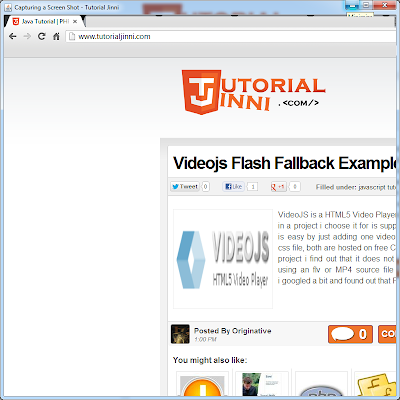
if every thing works as excepted then you will see a similar window as below.
Capturing a Screen Shot in java

Continue Reading...

Sunday, November 11, 2012

Loading Image in Applet JAVA


When you think of digital images, you probably think of sampled image formats such as the JPEG image format used in digital photography, or GIF images commonly used on web pages. All programs that can use these images must first convert them from that external format into an internal format.

Java supports loading these external image formats into its BufferedImage format using its Image I/O API which is in the javax.imageio package. Image I/O has built-in support for GIF, PNG, JPEG, BMP, and WBMP.
Below is the code to Load Image in Applet from a URL using BufferedImage class to minimize flickering.
import java.applet.*;
import java.awt.*;
import java.awt.image.*;
import java.net.*;
import javax.imageio.*;

/**
 *
 * @author Originative
 */
public class LoadImageInApplet extends Applet{
    BufferedImage image;
    @Override
    public void init() {
        // Load image
        try{
            URL url=new URL("https://blogger.googleusercontent.com/img/b/R29vZ2xl/AVvXsEhPXuqtqoMJe7qiBzdoL_Xk5q72Z47Hg6TuSIlaJS-joM-O0cLPkrs8JKvN9x-8BQFve5T923ZAJ8DE0-qwK1Zc7jgdMDqcQQETxpfhsGQDSI5Pwe8mZ-AZFgHBEXvfAtEtNniuWoEO_jA/s200/java.png");
            image = ImageIO.read(url);
        }
        catch(Exception ex){
            
        }        
    }
    @Override
    public void paint(Graphics g) {
        // Draw image
        g.drawImage(image, 0, 0, this);
    }
}
when you run this you will see something similar to this.


Continue Reading...

Saturday, November 10, 2012

JAVA Animation Applet Example


This is the simplest applet to animate an array of images. In practice, you should use double-buffering (which this example does not use) to eliminate flickering.
import java.applet.*;
import java.awt.*;

public class AnimApplet extends Applet implements Runnable {
    Image[] images = new Image[2];
    int frame = 0;
    volatile Thread thread;

    public void init() {
        images[0] = getImage(getDocumentBase(), "http://hostname/image0.gif");
        images[1] = getImage(getDocumentBase(), "http://hostname/image1.gif");
       // Replace with your own images
       // it is just a sample
    }
    public void start() {
        (thread = new Thread(this)).start();
    }
    public void stop() {
        thread = null;
    }
    public void paint(Graphics g) {
        g.drawImage(images[frame], 0, 0, this);
    }
    public void run() {
        int delay = 1000;    // 1 second
        try {
            while (thread == Thread.currentThread()) {
                frame = (frame+1)%images.length;
                repaint();
                Thread.sleep(delay);
            }
        } catch (Exception e) {
        }
    }
}
Continue Reading...

Basic Applet Program in JAVA

A Java applet is an applet delivered to users in the form of Java bytecode. Java applets can run in a Web browser using a Java Virtual Machine (JVM), or in Sun's AppletViewer, a stand-alone tool for testing applets. Java applets were introduced in the first version of the Java language in 1995, and are written in programming languages that compile to Java bytecode, usually in Java, but also in other languages such as Jython, JRuby, or Eiffel.

Every applet must subclass or extends Applet Class. Below is the skeleton of a simple Java Applet or a very simple applet.
import java.applet.*;
import java.awt.*;

public class BasicApplet extends Applet {
    // This method is called once by the browser when it starts the applet.
    public void init() {
    }

    // This method is called whenever the page containing this applet is made visible.
    public void start() {
    }

    // This method is called whenever the page containing this applet is not visible.
    public void stop() {
    }

    // This method is called once when the browser destroys this applet.
    public void destroy() {
    }

    // This method is called whenever this applet needs to repaint itself.
    public void paint(Graphics g) {
    }
}
Here is an example of an HTML file that will cause the browser to load and start the applet.
<applet code="BasicApplet" width="100" height="100">
</applet>
Continue Reading...

Friday, November 9, 2012

Applet Parameter Passing via HTML

An applet can be configured through the use of applet parameters. For example, the contents for a news ticker applet could be specified through an applet parameter.

Here's how an applet parameter would be specified in an HTML file. The example specifies two applet parameters called p1 and p2:
<applet code=AppletClassName width="100" height="100">
    <param name="p1" value="some text">
    <param name="p2" value="some more text">
</applet>
Here's how the value of an applet parameter can be retrieved:
String parameterName = "p1";
String value = applet.getParameter(parameterName);

parameterName = "p2";
value = applet.getParameter(parameterName);
Continue Reading...

Friday, September 9, 2011

Dynamically Increase Array Size in JAVA

In JAVA when you define an array you must know in advance how much elements there would be, once defined you cannot grow or shrink that array. There comes a problem when you do not know the exact amount of data that would come, more data mean more space required  to handle this situation we have to dynamically increase the size of the array or use some other way to handle this situation.

In this tutorial we will see Two different ways to solve the said issue.

  1. Using Vector
  2. Using ArrayList

Vectors

Vector is special type of array that expands dynamically as objects are added to it
    private void IncreaseArrayLengthUsingVector(){
        Vector v=new Vector();
        System.out.println("Vector Size = "+v.size());

        // Adding items to Vector
        v.add("Item 1");
        v.add("Item 2");
        v.add("Item 3");
        v.add("Item 4");
        System.out.println("Vector Size = "+v.size());

        // Vector indexs are zero based
        System.out.println("Item At Index 2 = "+v.get(1));

        // Removing an Item
        v.remove(2);
        System.out.println("Vector Size = "+v.size());

        // Printing All Elements in Vector
        System.out.println("All elements in Vector = "+v);
    }

Array List

You can also use ArrayList which extends AbstractList class and Implements List interface, usage is almost similar as that of Vector.
    private void increaseArrayLengthUsingArrayList(){
        ArrayList al = new ArrayList(); 
        System.out.println("ArrayList Size = " + al.size());

        // Adding items to the ArrayList
        al.add("JAVA");
        al.add("PHP");
        al.add("C#");
        al.add("HTML");
        al.add("Javascript");
        al.add("CSS");

        System.out.println("ArrayList Size = " +al.size());

        // Remove item from the ArrayList
        al.remove(2);

        System.out.println("ArrayList Size = " + al.size());

        // Display the ArrayList
        System.out.println("All elements in ArrayList" + al);
    }
Continue Reading...

Wednesday, August 24, 2011

Reading Text File in JAVA

One of the most important feature of any programming language is that is should provide an extensive set of Input/Output methods that fit in different scenarios according to programmers need and they should also be simple and powerful as much as they can. JAVA, a powerful and wonderful language is no exception, it provide a rich set of Input/Output operation. In this tutorial we will look some of the ways to provided by JAVA to read a simple Text File. We present only three ways to read a simple text file,  there are other methods too to achieve the same goal. Now let the code talk ...

Reading using BufferedReader

    private void readFileUsingBufferedReader(String filename){
        try{

            FileReader fileReader = new FileReader(filename);
            BufferedReader bufferReader = new BufferedReader(fileReader);
            
            String fileContents=null;

            while((fileContents = bufferReader.readLine()) != null){

                // Print to console line by line
                System.out.println(fileContents);
            }
            bufferReader.close();
        }
        catch(Exception ex){
            System.out.println(ex);
        }
    }

Reading using Scanner

    private void readFileUsingScanner(String filename){
        try{
            File file = new File(filename);

            Scanner scanner = new Scanner(file);
            
            // Scanner split content of file
            // in tokens by default space
            // is the delimiter.

            scanner.useDelimiter(System.getProperty("line.separator"));
            
            // line seperator for windows is \n\r
            // and for linux is \n
            // to make is cross paltform we use System.getProperty method

            while (scanner.hasNext()) {

                // Print to console line by line

                System.out.println(scanner.next());
            }
            scanner.close();
        }
        catch(Exception ex){
            System.out.println(ex);
        }
    }

Reading using FileInputStream

    private void readfileUsingFileInputStream(String filename){
        try{

            FileInputStream fileInputStream = new FileInputStream(filename);
            int k;
            while((k=fileInputStream.read())!=-1){

                // input stream read data byte by byte
                // so we have to explicitly typecast
                // it into char to reval it corresponding
                // charater.

                System.out.print((char)k);
            }
            fileInputStream.close();
        }
        catch(Exception ex){
            System.out.println(ex);
        }
    }
A sample usage of all the above methods...
import java.io.BufferedReader;
import java.io.File;
import java.io.FileInputStream;
import java.io.FileReader;
import java.io.InputStream;
import java.util.Scanner;

/**
 *
 * @author Originative
 */
public class TextFileReader {

    public static void main(String [] nix){

        String TEXT_FILE_TO_BE_READ = "c:\\myTextFile.txt";
        TextFileReader textFileReader=new TextFileReader();

        System.out.println("\n=-=-=-=\n Reading File via BufferedReader \n=-=-=-=\n");
        textFileReader.readFileUsingBufferedReader(TEXT_FILE_TO_BE_READ);

        System.out.println("\n=-=-=-=\n Reading File via Scanner \n=-=-=-=\n");
        textFileReader.readFileUsingScanner(TEXT_FILE_TO_BE_READ);

        System.out.println("\n=-=-=-=\n Reading File via FileInputStream \n=-=-=-=\n");
        textFileReader.readfileUsingFileInputStream(TEXT_FILE_TO_BE_READ);
    }
   // paste all methods here :)
}

Sample Output

=-=-=-=
 Reading File via BufferedReader 
=-=-=-=

Somthing that is going to read by java

code by

Originative for www.tutorialjinni.com

=-=-=-=
 Reading File via Scanner 
=-=-=-=

Somthing that is going to read by java

code by

Originative for www.tutorialjinni.com

=-=-=-=
 Reading File via FileInputStream 
=-=-=-=

Somthing that is going to read by java

code by

Originative for www.tutorialjinni.com
Continue Reading...

Wednesday, April 13, 2011

Command Line Input in JAVA

java tutorial
In this tutorial we will see techniques how can we pass input to a JAVA program via command lime or shell prompt. There are many ways in which we can pass input to our JAVA program i.e.
  • we can pass arguments when we initialize out program
  • we can use BufferedReader Class to take input
  • we can also use Scanner Class for the said purpose
and may others too, usually we use these mentioned above...

Now, Let the Code Talk

to pass argument at program initialization... suppose the below code except arguments
public class Echo {
    public static void main (String[] commandLineArguments) {
        for (String singleValue: commandLineArguments) {
            System.out.println(singleValue);
        }
    }
}
first compile the program and from console write
java Echo Java is Cool
the output will be
Java
is
Cool
Please Note arguments are space delimited and can be off any number

to pass argument at runtime we use BufferReader Class
import java.io.*;

public class Echo {
   public static void main (String[] nix) {

      //  prompt the user to enter their name
      System.out.print("Enter your name: ");

      //  open up standard input
      InputStreamReader stdIn=new InputStreamReader(System.in);
      BufferedReader buffRead = new BufferedReader(stdIn);

      String userName = null;

      //  read the username from the command-line;
      //  need to use try/catch with the
      //  readLine() method
      try {
         userName = buffRead.readLine();
      } catch (IOException ioe) {
         System.out.println("Error Occured"+ioe.getMessage());
         System.exit(1);
      }
      System.out.println("Thanks for the name, " + userName);
   }
}
here we readLine() Method, but we can also use read(); i read single character.

take input from console using Scanner Class, it provide rich set of methods to take input
import java.util.Scanner;

public class Echo {
    public static void main(String[] nix) {
        
        Scanner scanner = new Scanner(System.in);

        //
        // Read string input for username
        //
        System.out.print("Username: ");
        String username = scanner.nextLine();

        //
        // Read string input for password
        //
        System.out.print("Password: ");
        String password = scanner.nextLine();

        //
        // Read an integer input for another challenge
        //
        System.out.print("What is 2 + 2: ");
        int result = scanner.nextInt();

        if (username.equals("Originative") 
                && password.equals("tutorialjinni")
                && result == 4) {
            System.out.println("Welcome to Java Application");
        } else {
            System.out.println("Invalid username or password, access denied!");
        }
    }
}
Scanner has rich set of methods refer documentation for it.
Continue Reading...

Monday, April 4, 2011

Stack Data Structure in JAVA

stack data structure in java
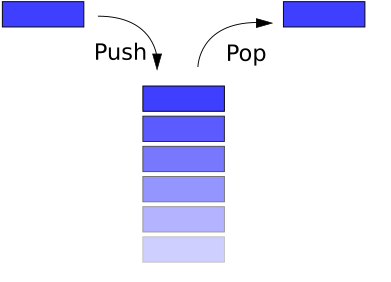
A stack is a last in, first out (LIFO) abstract data type and data structure. A stack can have any abstract data type as an element, but is characterized by only two fundamental operations: push and pop. The push operation adds an item to the top of the stack, hiding any items already on the stack, or initializing the stack if it is empty. The pop operation removes an item from the top of the stack, and returns this value to the caller. A pop either reveals previously concealed items, or results in an empty stack.

A stack is a restricted data structure, because only a small number of operations are performed on it. The nature of the pop and push operations also means that stack elements have a natural order. Elements are removed from the stack in the reverse order to the order of their addition: therefore, the lower elements are those that have been on the stack the longest

Now let the code talk...
class Olink{
 Object arr[];
 int Size;

 Olink(int Size_Stack){
  arr=new Object[Size_Stack];
  Size=0;
 }
 boolean chk_full(){
  return Size==arr.length;
 }
 boolean chk_empty(){
  return Size==0;
 }
 void push(Object d){
  if(!(chk_full())) arr[Size++]=d;
  else System.out.println("Stack Full !");
 }
 Object pop(){
  if(!(chk_empty())) return arr[--Size];
  else {
   System.out.println("Stack Empty !");
   return null;
  }
 }
 Object peek(){
  if(!(chk_empty())) return arr[Size];
  else {
   System.out.println("Stack Empty");
   return null;
  }
 }
 void show(){
  for (int i=0;i<Size;i++){
   System.out.print(arr[i]+" ");
  }
 }
}
class StackArray{
 public static void main(String [] nix){
  Olink o=new Olink(10);
  o.push(1);
  o.push(2);
  o.push(3);
  o.push(4);
  o.push(5);
  o.push(6);
  o.push(7);
  o.push(8);
  o.push(9);
  o.push(10);
  o.push(11);
  System.out.println("pop : "+o.pop());
  System.out.println("pop : "+o.pop());
  System.out.println("pop : "+o.pop());
  o.show();
 }
}
Firstly we create a stack of size 10 and then push a value on it by pushing we just increment the value of size variable until its value equals to array length, once it is full no value is inserted, to pop a value out from the stack we just decrement the value of size variable and return the value, peek will give the value that will be pop out next.
Continue Reading...

Tuesday, March 29, 2011

Data Structure Singly LinkList in java

java tutorial
Linked lists are among the simplest and most common data structures. They can be used to implement several other common abstract data structures, including stacks, queues, associative arrays, and symbolic expressions, though it is not uncommon to implement the other data structures directly without using a list as the basis of implementation.

The principal benefit of a linked list over a conventional array is that the list elements can easily be added or removed without reallocation or reorganization of the entire structure because the data items need not be stored contiguously in memory or on disk. Linked lists allow insertion and removal of nodes at any point in the list, and can do so with a constant number of operations if the link previous to the link being added or removed is maintained during list traversal.

On the other hand, simple linked lists by themselves do not allow random access to the data other than the first node's data, or any form of efficient indexing. Thus, many basic operations — such as obtaining the last node of the list (assuming that the last node is not maintained as separate node reference in the list structure), or finding a node that contains a given datum, or locating the place where a new node should be inserted may require scanning most or all of the list elements.

Singly Link Ling in java data structure
A linked list whose nodes contain two fields: an integer value and a link to the next node

Now let implement it in java, first we need a class of which we want to make links in the list we call it, say Link, below is the code to that class
class Link{
    private String data;
    private int id;
    private Link next;

    /**
     * @return the data
     */
    public String getData() {
        return data;
    }

    /**
     * @param data the data to set
     */
    public void setData(String data) {
        this.data = data;
    }

    /**
     * @return the id
     */
    public int getId() {
        return id;
    }

    /**
     * @param id the id to set
     */
    public void setId(int id) {
        this.id = id;
    }

    /**
     * @return the next
     */
    public Link getNext() {
        return next;
    }

    /**
     * @param next the next to set
     */
    public void setNext(Link next) {
        this.next = next;
    }
    public void printData(){
        System.out.println(id+" => "+data);
    }
}
in the class we make three data members id of type int, data of type String and the last member next, focus on its data type it is Link itself, this is because we will store the reference of the next Link in next data member using its assessor method.

Now create a class in which we make the singly link list using the Link class we just made.
class LinkList {
    private Link first;

    public LinkList(){
        first=null;
    }
    public void addLink(int id, String data){
        Link link=new Link();
        link.setId(id);
        link.setData(data);
        link.setNext(first);
        first=link;
        //first.printData();// un-comment this line to see what data is added 

    }
    public void printList(){
        Link currentLink=first;
        System.out.println("Printing List:");
        if(currentLink==null){
            System.out.println("List is Empty, Consider adding elements.");
            return;
        }
        while(currentLink!=null){
            currentLink.printData();
            currentLink=currentLink.getNext();
        }
    }
    public static void main(String []nix){
        LinkList linklist=new LinkList();
        linklist.printList();
        linklist.addLink(1, "val1");
        linklist.addLink(2, "val2");
        linklist.addLink(3, "val3");
        linklist.addLink(4, "val4");
        linklist.printList();
    }
}
in this class we made two methods first method addLink add a new link at the head of the previous node, line link.setNext(first); set the existing reference of the link list to the next of the new link object and first=link; make the first reference to the newly created link, hence we can add any link at the head of the list. Second method, printList() simply iterate through all the "link" objects in the link list
Continue Reading...

Sunday, January 30, 2011

JAVA Socket Programming Tutorial

This example introduces you to Java socket programming. The server listens for a connection. When a connection is established by a client. The client can send data. In the current example the client sends the message "Hi my server". To terminate the connection, the client sends the message "bye". Then the server sends the message "bye" too. Finally the connection is ended and the server waits for an other connection. The two programs should be runned in the same machine. however if you want to run them in two different machines, you may simply change the adress "localhost" by the IP adress of the machine where you will run the server.

The Server

import java.io.*;
import java.net.*;
public class Provider{
    ServerSocket providerSocket;
    Socket connection = null;
    ObjectOutputStream out;
    ObjectInputStream in;
    String message;
    Provider(){}
    void run()
    {
        try{
            //1. creating a server socket
            providerSocket = new ServerSocket(2004, 10);
            //2. Wait for connection
            System.out.println("Waiting for connection");
            connection = providerSocket.accept();
            System.out.println("Connection received from " + connection.getInetAddress().getHostName());
            //3. get Input and Output streams
            out = new ObjectOutputStream(connection.getOutputStream());
            out.flush();
            in = new ObjectInputStream(connection.getInputStream());
            sendMessage("Connection successful");
            //4. The two parts communicate via the input and output streams
            do{
                try{
                        message = (String)in.readObject();
                        System.out.println("client>" + message);
                        if (message.equals("bye"))
                                sendMessage("bye");
                }
                catch(ClassNotFoundException classnot){
                        System.err.println("Data received in unknown format");
                }
            }while(!message.equals("bye"));
        }
        catch(IOException ioException){
                ioException.printStackTrace();
        }
        finally{
            //4: Closing connection
            try{
                    in.close();
                    out.close();
                    providerSocket.close();
            }
            catch(IOException ioException){
                    ioException.printStackTrace();
            }
        }
    }
    void sendMessage(String msg)
    {
        try{
                out.writeObject(msg);
                out.flush();
                System.out.println("server>" + msg);
        }
        catch(IOException ioException){
                ioException.printStackTrace();
        }
    }
    public static void main(String args[])
    {
        Provider server = new Provider();
        while(true){
                server.run();
        }
    }
}


The Client

import java.io.*;
import java.net.*;
public class Requester{
    Socket requestSocket;
    ObjectOutputStream out;
    ObjectInputStream in;
    String message;
    Requester(){}
    void run()
    {
        try{
            //1. creating a socket to connect to the server
            requestSocket = new Socket("localhost", 2004);
            System.out.println("Connected to localhost in port 2004");
            //2. get Input and Output streams
            out = new ObjectOutputStream(requestSocket.getOutputStream());
            out.flush();
            in = new ObjectInputStream(requestSocket.getInputStream());
            //3: Communicating with the server
            do{
                    try{
                            message = (String)in.readObject();
                            System.out.println("server>" + message);
                            sendMessage("Hi my server");
                            message = "bye";
                            sendMessage(message);
                    }
                    catch(ClassNotFoundException classNot){
                            System.err.println("data received in unknown format");
                    }
            }while(!message.equals("bye"));
        }
            catch(UnknownHostException unknownHost){
                    System.err.println("You are trying to connect to an unknown host!");
            }
            catch(IOException ioException){
                    ioException.printStackTrace();
            }
            finally{
                //4: Closing connection
                try{
                        in.close();
                        out.close();
                        requestSocket.close();
                }
                catch(IOException ioException){
                        ioException.printStackTrace();
                }
            }
    }
    void sendMessage(String msg)
    {
        try{
                out.writeObject(msg);
                out.flush();
                System.out.println("client>" + msg);
        }
        catch(IOException ioException){
                ioException.printStackTrace();
        }
    }
    public static void main(String args[])
    {
            Requester client = new Requester();
            client.run();
    }
}
Continue Reading...

Sunday, September 26, 2010

Zoom Image in Java

In an organization there are many enterprise java or normal java application that includes images to display, for that one can easily put an image in jPanel or draw it on a Canvas... but to zoom that in to get the most details or highlight some important parts of image... i had been in a similar situation couple of days back... i ask my friend Google for it... it does not give me any pure solution to my problem but it gives me clues which were very helpful and i was able to complete that application in time and get appreciation from my boss as well :) ... now i want to share my Zoom Utility with the world.

it is very simple and easy ... first i get the images, which is a screen shot basically, using java's built in Class Robot and paint it in a JFrame and just scale that image ... i use a screen shot of the screen as that was my requirement you can also create an image from a file ... for that
// remove this portion ...
Robot r= new Robot();
Rectangle rect = new Rectangle(0,0,d.width,d.height);
img = r.createScreenCapture(rect);

// with this...
img=Toolkit.getDefaultToolkit().getImage("PATH_TO_IMAGE");

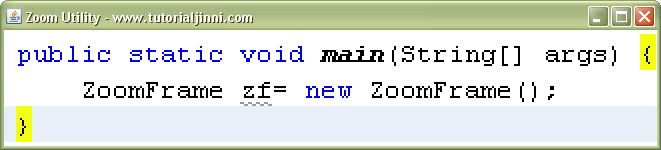
my zoom application will look like something like that ... ofcourse it is not the original application :)

zoom image java

left click will trigger zoom-in function and right click will trigger zoom-out function... the complete code of my Zoom application was somthing like this

Source Code

class ZoomFrame extends JFrame implements WindowListener, ComponentListener,MouseListener  {
    Image img;
    boolean bo = true;
    static double amount=2;

    public ZoomFrame(){
        setSize(150,150);
        setVisible(true);
        setTitle("Zoom Utility - www.tutorialjinni.com ");
        capture();
        addMouseListener(this);
        addWindowListener(this);
        addComponentListener(this);
    }
    public void capture(){
        Dimension d = Toolkit.getDefaultToolkit().getScreenSize();
        try {
            Robot r= new Robot();
            Rectangle rect = new Rectangle(0,0,d.width,d.height);
            img = r.createScreenCapture(rect);
            /*
            *  You can also put here image like...
            *  img=Toolkit.getDefaultToolkit().getImage("PATH_TO_IMAGE");
            */
        }
        catch(Exception e) {
            System.out.println(e);
        }
    }
    @Override
    public void paint(Graphics g){
        Graphics2D g2=(Graphics2D)g;
        g2.scale(amount,amount);
        g2.drawImage(img,0,0,getWidth(),getHeight(),getX(),getY(),getX()+getWidth(),getY()+getHeight(),this);

    }
    @Override
    public void update(Graphics g){
        paint(g);
    }
    public void windowClosing(WindowEvent we){
        this.dispose();
        //System.exit(0);
    }

    void zoomIn(){
        amount=amount+.5;
        repaint();
    }
    void zoomOut(){
        if(amount>1){
           amount=amount-.5;
        }
        repaint();
    }
    public void windowClosed(WindowEvent we){
        //setVisible(false);
        System.exit(1);
    }
    public void windowOpened(WindowEvent we){}
    public void windowIconified(WindowEvent we){}
    public void windowDeiconified(WindowEvent we){}

    public void windowActivated(WindowEvent we){
        if (bo == false){
            setVisible(false);
            capture();
            bo = true;
            setVisible(true);
        }
        else{
            bo = false;
        }
    }

    public void windowDeactivated(WindowEvent we){

    }

    public void componentMoved(ComponentEvent ce){
        repaint();
    }

    public void componentHidden(ComponentEvent ce){

    }
    public void componentShown(ComponentEvent ce){}
    public void componentResized(ComponentEvent ce){}

    public void mouseClicked(MouseEvent e) {
        switch(e.getModifiers()){
            case InputEvent.BUTTON1_MASK:{
                zoomIn();
                break;
            }
            case InputEvent.BUTTON3_MASK:{
                zoomOut();
                break;
            }
        }
    }

    public void mousePressed(MouseEvent e) {
       // throw new UnsupportedOperationException("Not supported yet.");
    }

    public void mouseReleased(MouseEvent e) {
       // throw new UnsupportedOperationException("Not supported yet.");
    }

    public void mouseEntered(MouseEvent e) {
        //throw new UnsupportedOperationException("Not supported yet.");
    }

    public void mouseExited(MouseEvent e) {
        //throw new UnsupportedOperationException("Not supported yet.");
    }
}
you can also download a Netbeans Project so can start working immediately ...

Continue Reading...

Friday, September 24, 2010

Write UTF-8 File in JAVA

Writing a UTF-8 file or in other words a file which contains symbols which are not used in normal English, symbols or character of Arabic, Urdu or Persian comes in this category. if you try to write the file in a normal way as you did to write any other file the information in that file will be corrupted and you get something like "????" in place of your UTF-8 chars, so in order to prevent it from corruption java provide a very easy method to do this below is the sample code to read UTF-8 file in java.

Sample Code

public void Writer(String fileName,String UTF_8_Data,boolean appendOrNot){
    try{
        FileOutputStream fout=new FileOutputStream(fileName,appendOrNot);
        BufferedWriter bw=new BufferedWriter(new OutputStreamWriter(fout,"UTF8"));
        bw.write(UTF_8_Data,0,UTF_8_Data.length());
        bw.flush();
    }
    catch(Exception ex){
        System.out.println(ex);
    }
}
Continue Reading...

Thursday, September 23, 2010

Read UTF-8 File in JAVA

Reading a UTF-8 file or in other words a file which contains symbols which are not used in normal English, symbols or character of Arabic, Urdu or Persian comes in this category. if you try to read the file in a normal way as you did to read any other file the information in that file will be corrupted so in order to prevent it from corruption java provide a very easy method to do this below is the sample code to read UTF-8 file in java.

Sample Code

class UTF_File_Reader{

public void readFile(){
    try{
        FileInputStream fin=new FileInputStream("PATH_TO_UTF-8_FILE");
        InputStreamReader isr=new InputStreamReader(fin,"UTF-8");
        // you can write other encoding as well
        // like UTF-7, iso-8859-1 etc ...
        BufferedReader br=new BufferedReader(isr);
        String temp="";
       while((temp=br.readLine())!=null){
           //Something Useful here
        }
    }
    catch(Exception ex){
        System.out.println(ex);
    }
}
}
Continue Reading...

Thursday, September 2, 2010

Java MySQL Connection

MySQL is a great and powerful database and its combination with JAVA make is much more powerful. I would not go in long stories, i would tell you simple how to make a JDBC connection between JAVA and MySQL. for that you need java and mysql (of course) and MySQL JConnector (download it). once you download the jar file put it in the classpath of you project and use the following code to make connection and thats all you successfully make a JAVA MySQL connection.

import java.sql.*;
public class DBClass {
private Statement getStatement(){
Statement st=null;
try{
Class.forName("com.mysql.jdbc.Driver").newInstance();
Connection con=DriverManager.getConnection("jdbc:mysql://localhost:3306/DB_NAME", "USER_NAME", "SECRET_PASSWORD");
st=con.createStatement();
}
catch(Exception d){
System.out.println(d);
}
return st;
}

public ResultSet rs(String q){
ResultSet rs=null;
try{
rs=getStatement().executeQuery(q);
}
catch(Exception d){
System.out.println(d);
}
return rs;
}
public int updateQuery(String q){
int k = 0;
try{
k=getStatement().executeUpdate(q);
}
catch(Exception d){
System.out.println(d);
}
return k;
}
}
Continue Reading...

Sunday, August 15, 2010

Java Media Player ( MP3 Player )

Recently i was in a situation when i have to play mp3 in my java project, i google a bit and quickly found a solution, a pure java library namely JLayer by javazoom . i found i very interesting as it provide almost all functionality i wanted expect that i want a GUI for playing and pausing the media, much like a basic media player so i develop a small media player and i to share it as someone else might want it, so here is the code of the java media player.

import java.awt.*;
import java.awt.event.*;
import java.io.*;
import java.util.*;
import javax.swing.*;
import javazoom.jlgui.basicplayer.*;

class JavaMediaPlayer extends JPanel implements BasicPlayerListener{

private JProgressBar jpb;
private JButton play;
private BasicPlayer player=new BasicPlayer();;
private String imagePath="images/";
private static int p=0;
private static boolean playBoolean=true;

JavaMediaPlayer(){

setLayout(null);

player.addBasicPlayerListener(this);

play=new JButton(new ImageIcon(imagePath+"pause.png"));
play.setToolTipText("pause");play.setBounds(2,2,20,20);

play.addActionListener(new ActionListener(){
public void actionPerformed(ActionEvent ae){
if(playBoolean){
pausePlaying();
play.setToolTipText("Play");
play.setIcon(new ImageIcon(imagePath+"play.png"));
playBoolean=false;
return;
}
if(playBoolean==false){
resumePlaying();
play.setToolTipText("Pause");
play.setIcon(new ImageIcon(imagePath+"pause.png"));
playBoolean=true;
return;
}
}
});

jpb=new JProgressBar();
jpb.setBorderPainted(true);
jpb.setBounds(25,2,280,20);

add(play);
add(jpb);
}

public void startPlaying(String fileName){
try{
play.setIcon(new ImageIcon(imagePath+"pause.png"));
play.setToolTipText("Pause");
playBoolean=true;
player.open(new File(fileName));
player.play();//actually play file
}
catch(Exception d){
System.out.println(d);
}
}
private void pausePlaying(){
try{
player.pause();
}
catch(Exception e){
System.out.println(e);
}
}
private void stopPlaying(){
try{
player.stop();
jpb.setValue(0);
}
catch(Exception d){
System.out.println(d);
}
}
private void resumePlaying(){
try{
player.resume();
}
catch(Exception d){
System.out.println(d);
}
}

public void opened(Object arg0, Map map) {
String k=map.get("audio.length.frames").toString();
jpb.setMaximum(Integer.parseInt(k)-15);
}

public void progress(int arg0, long arg1, byte[] arg2, Map map) {
String s=map.get("mp3.frame").toString();
int k=(p-(Integer.parseInt(s))*(-1));
jpb.setValue(k);
}

public void stateUpdated(BasicPlayerEvent bpev) {
if(bpev.getCode()==BasicPlayerEvent.STOPPED){
// Something here
}
}
public void setController(BasicController arg0) {
// throw new UnsupportedOperationException("Not supported yet.");
}
}


and the initializing code of the above code for java media player is as follows you can use it as you want it, its just for demonstration.

import javax.swing.*;

class Main {

public static void main(String[] args) {
JFrame f=new JFrame();
JavaMediaPlayer jmp=new JavaMediaPlayer();
f.add(jmp);
f.setDefaultCloseOperation(3);
f.setVisible(true);
f.setSize(330,60);
f.setTitle("Java Media Player - Tutorial Jinni");
jmp.startPlaying("PATH_TO_MP3_FILE");
}
}


after you run it should be somewhat like this.

java media player

You can download a netbeans project, it contains all the libraries you want to make a java mp3 player.

download free java mp3 player

Download Sample Code

Continue Reading...
 

Blog Info

A Pakistani Website by Originative Systems

Total Pageviews

Tutorial Jinni Copyright © 2015 WoodMag is Modified by Originative Systems